
Corrective Actions Improvements
We have made it easy to assign Corrective Action Recommendations using software generated emails. In addition, the email recipients can simply respond via web form which will populate their response in the Corrective Action Taken field in Parklane.
How it works:
- Identify who is to perform the corrective action.
- Prompt the system to send them an email. The software will attach a PDF that includes the pertinent incident information and the corrective action recommendation.
- The PDF contains a hyperlink to a web form that is associated with the incident. It is used by the recipient to identify the actions they performed and if need be, upload up to five applicable files and/or images.
You must have Parklane's Share and web framework to use this new feature.
Included in Update:
- Changes to Corrective Actions panel - located on the incident’s Types, Causes and Corrective Actions panel under the F7 Details button.
- New panel - Email Templates panel was added under More > Options.
- New web page - Correction Action Response
Changes to the Corrective Actions Panel
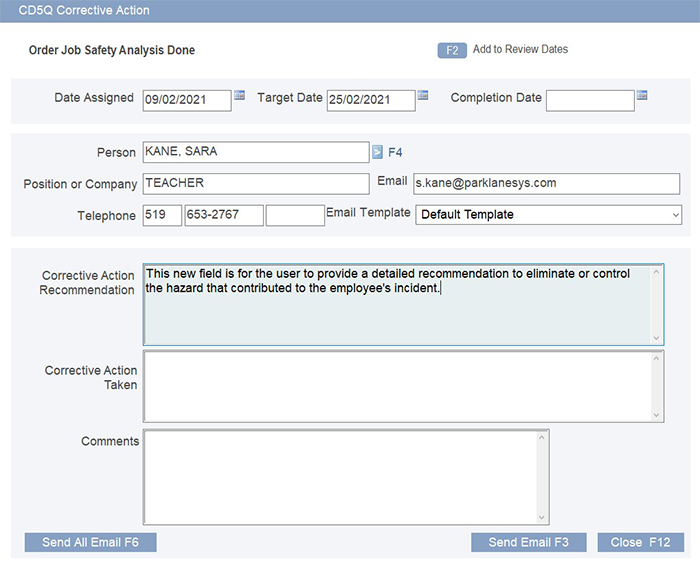
This panel was updated to accommodate all the requirements for managing Correction Actions.
Additions include:
- Corrective Action Recommendation
- Person lookup (emails auto-populate if present on Personal Data Record)
- Email Template selection
- Send Email button to email one corrective action recommendation
- Send All Emails button to email all corrective action recommendations
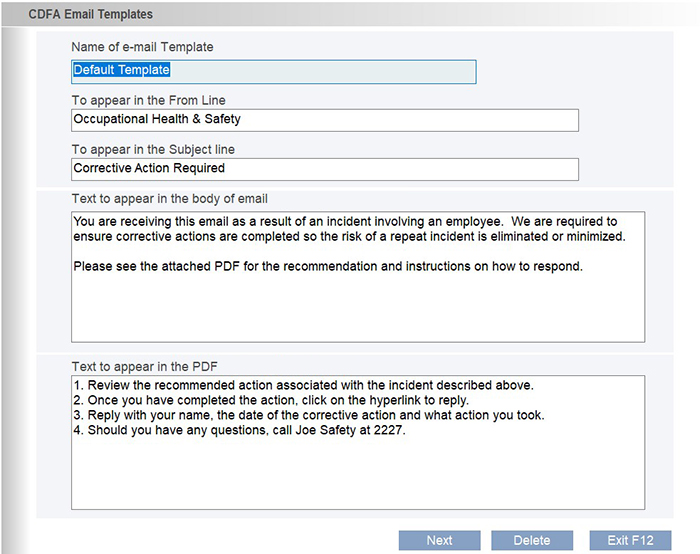
Email Templates
The Email Templates panel allows the user to identify who the email is from, the subject, the text to appear in the body of the email and the text that will appear in the attached PDF. Multiple templates may be created to fit the various situations. - eg. Reminder, Overdue templates etc.
Templates are setup under More > Options > Email Templates
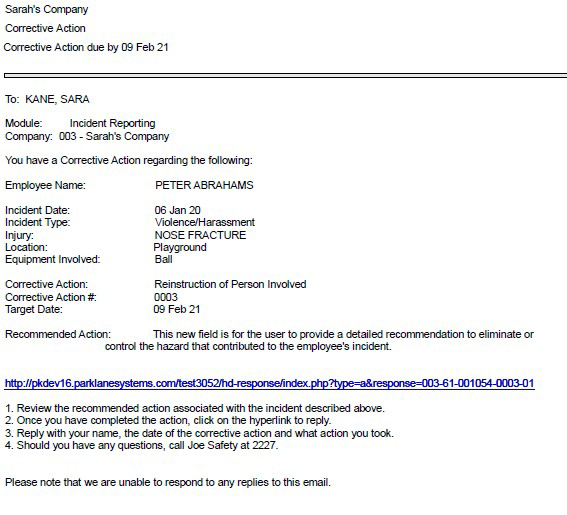
Email Attachment
The PDF attached to the email contains information regarding the incident, the recommendation and a hyperlink to the web-based Reponse Page that points to that incident.
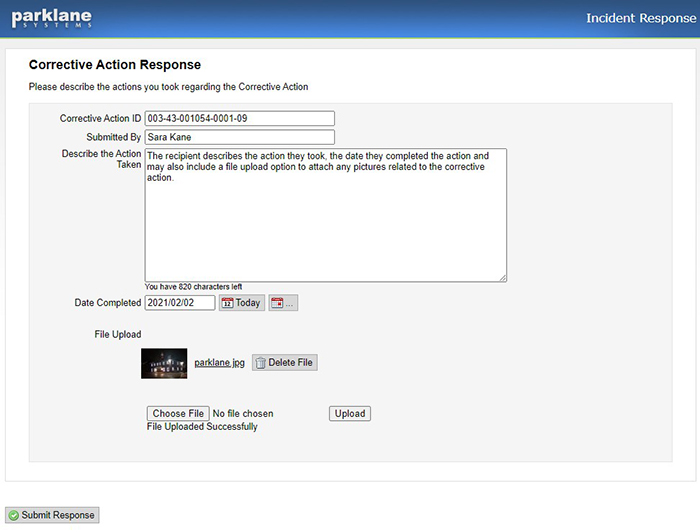
Corrective Action Response Page
When the email recipient clicks on the hyperlink, the Corrective Action Response page opens where they can enter their name, the action they took and the date it was completed. They can also upload accompanying documents or images with the submission.
Once submitted, Parklane enters the Action Taken and Completion Dates in the appropriate fields, attaches the any accompanying documents in Document Links and notifies the Managing Staff of the submitted action.
Feature Setup
Should you wish to take advantage of this new functionality, you are required to complete the following steps:
- Update your system (Release date February 10 or later).
- Contact Support to activate the Corrective Action Response Page.
- Begin by creating your Email Templates.
Roll Out Tutorial
As with our other online products, we will be providing a link to a tutorial. Should you wish, this link can be included in your email templates. This short tutorial will educate email recipients on how to respond to these new email recommendations.
The tutorial will be available next week on the Resource Page.
If you need any assistance updating, contact Parklane Support (519-657-3386, then press 1)
Should there be a topic of interest you would like to see included in our newsletter, or Comment / suggestion you would like to share, don’t hesitate to let us know at resources@parklanesys.com.
To Unsubscribe from further emails, please Click Here,
or reply to this message with Remove as the subject line.
10-521 Nottinghill Road, London, Ontario, Canada, N6K 4L4
Tel: 519-657-3386
www.parklanesys.com