Click Here for PDF Copy which includes a list of exported fields that are in each report.
|
| Report name |
Report View (click image) |
Export Headings |
Report Description |
Compliance - Scheduled |
BHA
|
Test Group
Test
Department Group
Name
Status
ID
Date Test Taken
Next Due Date
Next Chained Test
Next Chained Date
Test Status
In A Word
Key
Supervisor
Dept Code
Business Email
|
Choose a test for overall and Dept/Group numbers. Compliance based on due date of next scheduled test (includes: compliant, overdue, noncompliant).
You may also choose multiple chained tests in ONE Recall Group. Will report details of the last of those tests that was taken. If any tests within a chain have been taken (and is prior to their next scheduled date) will result in compliance. (eg. TB series)
Note: This report includes due dates of tests that are enrolled in the recall process only – i.e. a test that is recorded, then auto-scheduled by system. They do not include tests that have been manually scheduled.
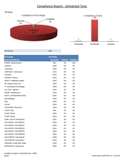
- Main sheet: Pie graph of overall compliance percentage, bar graph of numbers of compliant, overdue and no results. Includes table of departments with percentages.
- Second sheet: Table of dept/group, employee name, last test taken, date taken, next chained test, next due date in chain, status. Filtering status drop down will narrow down overdue results.
- Third sheet: Table of Dept/Group, Name, counts of test status.
- Fourth sheet: Provides table sorted by position, dept/group and compliance percentages.
|
Compliance - Taken |
BHB
|
Test Group
Test
Department Group
Full Name
Status
Position
Union
Date Taken
Numeric
Text
In A Word
Key
Year End
Dept Description
Supervisor
Dept Code
Business Email
|
Choose up to 5 tests for overall and Dept/Group numbers. Compliance based on date taken within date range. eg. If test was taken within date range = compliant. (includes: compliant or no record). This report displays the last test taken for each test chosen.
- Main sheet: Bar graph of each test totals, including counts for those with no records for any of the tests chosen. Graph of totals by type of test and year.
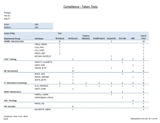
- Second sheet: Table of dept/group, employees, test name, date taken (if applicable) and checked off if compliant.
- Third sheet: Table of departments, employees, counts whether they have taken the test(s) or have no records.
- Fourth sheet: Table of Dept/Group with percentages of test taken. Best for when only one test is chosen.
|
Recall Statistics |
BHC
|
Test Group
Test
Department Group
Name
Status
ID
Date Test Taken
Next Due Date
Test Status
In A Word
Key
Year End
Dept Description
Supervisor
Dept Code
Business Email
|
Choose tests to examine by dept/group. Report will pull last test taken (if there is one recorded) of all tests chosen within date range.
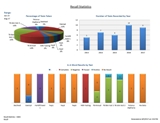
- Main sheet: Pie chart of percentage taken of all tests chosen, chart of all test activity combined by year, chart of number test types by “In A Word”.
- Second sheet: Table by Dept/Group, includes name, test taken, date test taken, due date (if applicable) and test status (note: if a next test is not booked, it will reflect as overdue).
- Third sheet: Table of tests by dept/group, employee names and test taken counts.
- Fourth sheet: Table of dept/group and test counts.
- Fifth sheet: Table of tests and test status counts.
- Sixth sheet: Table by dept/group, name, test and In A Word Counts.
|
Employee Records |
BHD
|
Test Group
Test
Name
Date of Birth
Position
Date Test Taken
Next Due Date
Test Status
In A Word
Numeric
Text
Key
Dept Description
Supervisor |
Choose one employee to display all records and status. If a test has been taken more than once, it will include the last test taken.
Note: Any due dates included in this report are of tests that are enrolled in the recall process only – i.e. a test is recorded, then auto-scheduled by system. They do not include dates that have been manually scheduled.
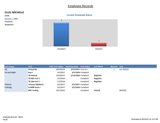
- Main sheet: Graph of number of compliant vs. any overdue. Table of tests organized by test group, date taken, due date (if applicable), test status, in a word, number and text fields.
|
Compliance - MultiGroup |
BHE
|
Test group
Test
Name
DOB
Dept/Group
Dept Code
Dept Description
Emp ID
Position
Date test taken
Test status
In a Word
Numeric
Text
Additional comments
Notes
Key
Year End
Dept Description
Supervisor
Business Email
|
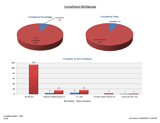
Choose Date Range of those are compliant (eg. if pulling N95 Tests, choose two year range). Report will pull the last test taken of ALL tests selected for all employees. Report will indicate who is compliant, who is not compliant (incl. when they last had the test), and those who never had the test.
- Main sheet: Pie graph of compliance vs non-compliance by percentage. Pie graph of the numbers of compliant vs numbers not compliant. Bar graph of each test and the numbers compliant vs non-compliant.
- Sheet two: Table by Dept/Group, includes name, position, date test taken, test taken, test status: Compliant vs. Non-Compliant.
- Sheet three: Table by Dept/Group, includes # compliant, # non-compliant and total employees.
- Sheet four: Table of Dept/Group, includes percentages of those compliant vs. non-compliant.
- Sheet five: Table of Dept/Group, includes percentages of compliant vs. non-compliant by position and duplicate table of numbers.
- Sheet six: Table by position, includes name, department, date test taken, test taken, # of compliant vs. non-compliant.
- Sheet seven: Bar graph of compliance by position. Includes table of percentages and numbers of compliance.
|
| Taken / Due |
BHG
|
Key Name
Date of Birth
Department/Group
Department Code
Department Desc
Emp ID
Position
Date Of Hire
Test Name
Test Taken
Test Due
Test Over Due
Employee Status
Phone Number
Dept Description
Supervisor
Business Email
|
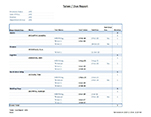
This report allows you to select all tests, or individual tests. For each employee it will display when it was last taken, when it is due/scheduled to be repeated (if applicable) and indicate whether it is overdue.
Note: if an employee is not booked for any of the tests chosen, or has never received any of the tests, they will not appear on the report.
- Main sheet: Table sorted by dept/group, including name, name of test, date taken, date due, indicates whether they are overdue and counts. All headings may be filtered.
- Sheet two: Table sorted by supervisor, includes all overdue tests - including employee, name of test, date taken, date due. All headings may be filtered.
- Sheet 3: Collapsible table of counts by position and test.
- Sheet 4: Table of tests that include # of tests taken and # of overdue.
|
| Test Results |
BHJ
|
Test Group
Test
Group
Dept Code
Department
Name
EE ID
EE Status
Birth Date
Gender
EE Key
Enter By
Date Entered
Time Entered
Function
Date Taken
Numeric Results
Text Results
In a Word
Position
Union
Notes
Comments
Year End
Business Email
|
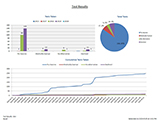
This report pulls all test result available within date range (eg. If test was taken 3 times in the date range, all 3 will appear on report). Report will report on up to 10 different tests.
- Main sheet: Graph of tests taken by year, pie chart of tests taken, cumulative line graph of tests.
- Sheet two: Table with counts of the tests that have been taken by dept/group.
- Sheet three: Table with counts of tests that have been taken sorted by In A Word.
- Sheet four: Table with counts of tests by employee. Includes date taken, test, text results, in a word and any numeric results.
|
